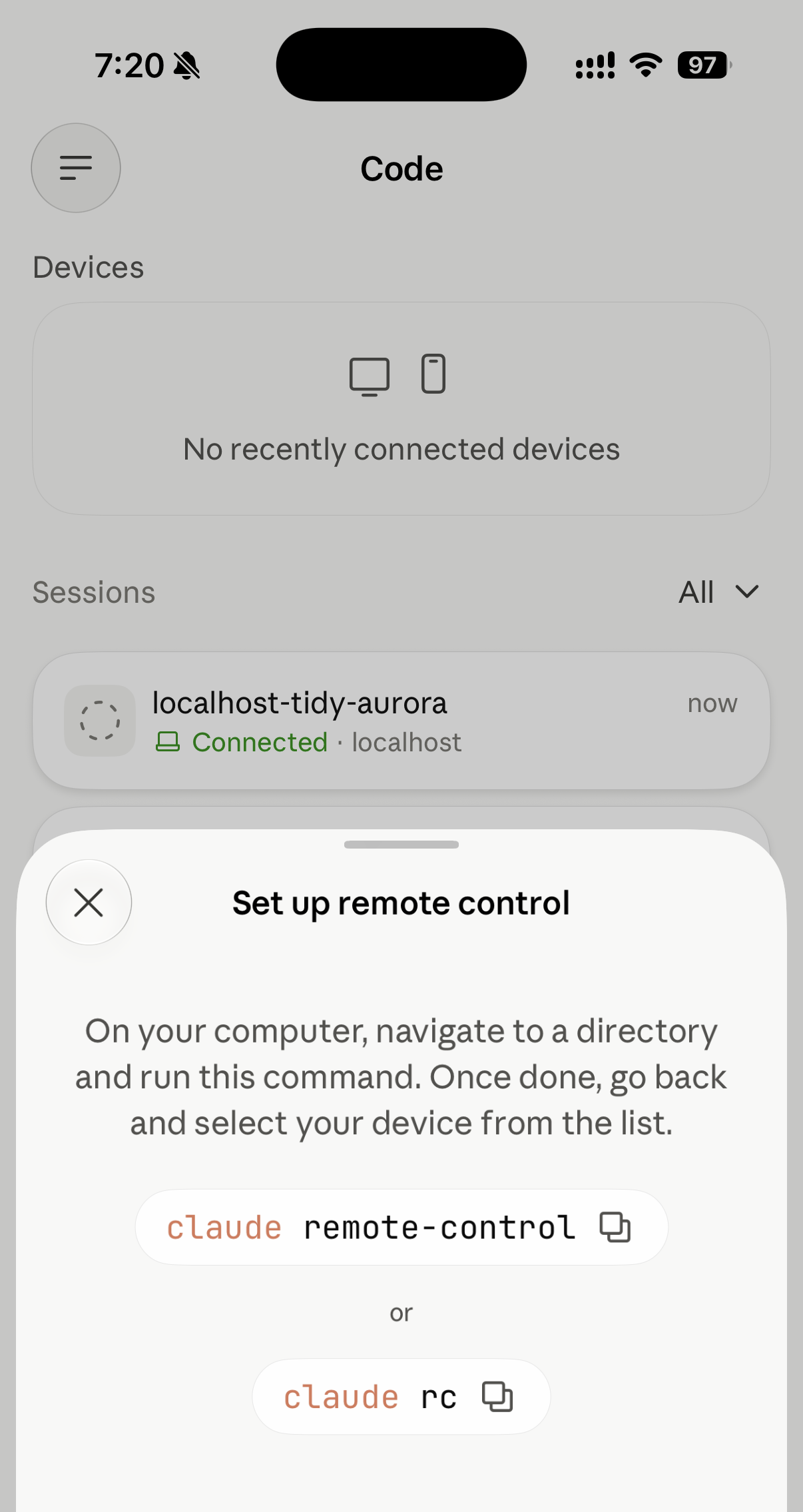
I updated the Claude iOS app yesterday (1.260709.0), opened the Code tab, and found a new Devices panel. It started out empty — "No recently connected devices" — and tapping through gave me a setup sheet telling me to go to a directory on my computer and run claude remote-control or claude rc:
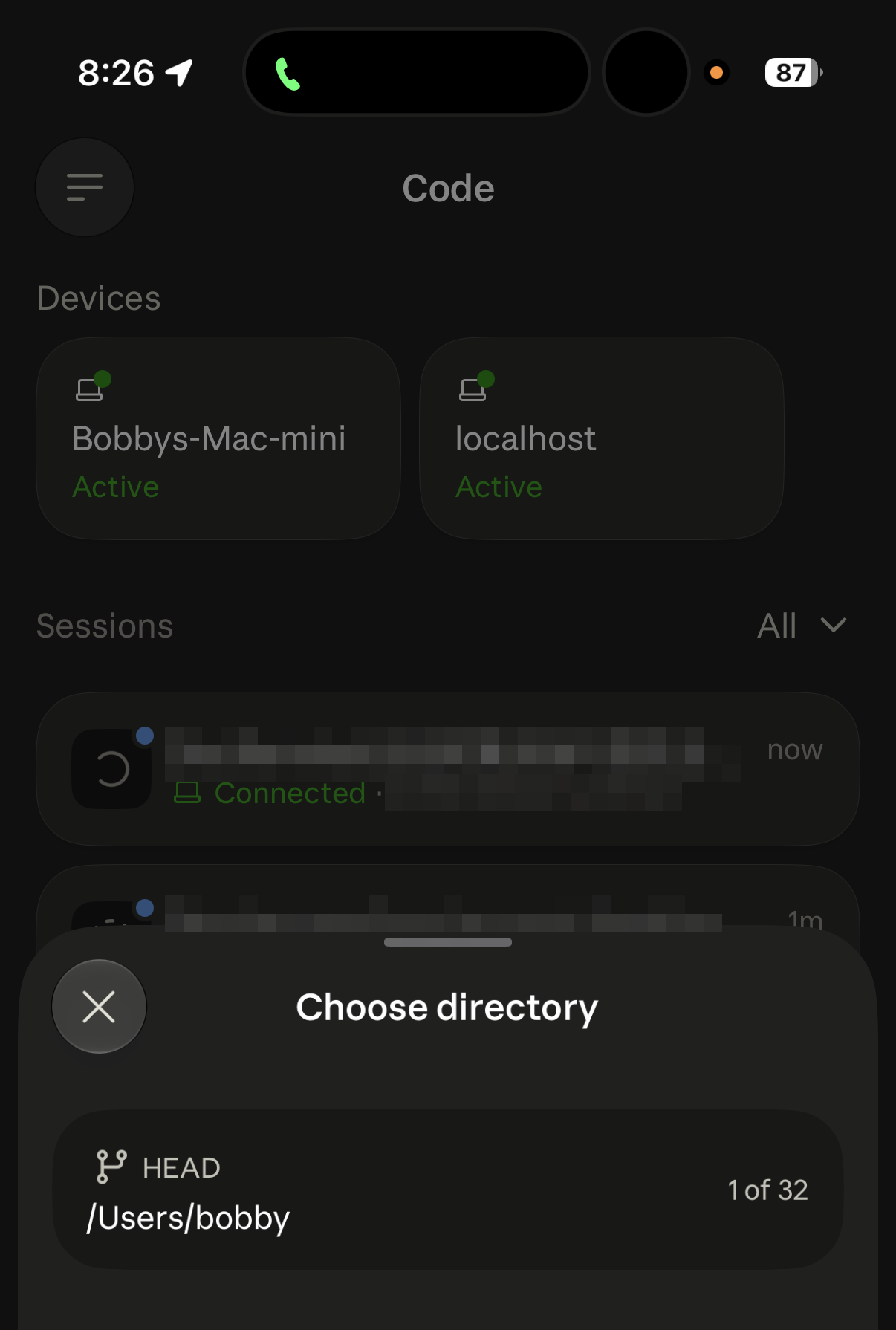
So I did — started server mode on the machine, then went back to the phone. There it was under Devices, marked Active. A tap lets me pick a directory and start a new remote session on it, with the capacity shown on the right as 1 of 32:
That entry point really is new. Back in March, someone on GitHub asked how to spawn a new remote-control session from the iOS app (#34626) — the terminal clearly said capacity 1/32, but tapping + on the phone gave you a cloud session rather than a new session on the local server. In May someone filed a feature request for exactly this: spawn a session on a paired Mac from iOS (#57904). Both were closed as not planned, and now the capability is simply there in the app — the App Store notes say only "Squashed some bugs and improved the overall experience."
Server mode on the CLI side, meanwhile, has been there all along: the claude remote-control subcommand shipped with Remote Control in February 2026 (v2.1.51), whose release note reads "Added claude remote-control subcommand for external builds, enabling local environment serving for all users." So what the phone gained is the entry point, not the capability.
Following that feature, here are the parts worth spelling out.
Remote Control is not "cloud-driven"
Claude Code on iOS has two paths that run in opposite directions. Mix them up and nothing makes sense:
- Claude Code on the web (cloud sessions): runs in a sandbox VM in Anthropic's cloud, pulls code from a GitHub repo, and has no access to your local filesystem or MCP servers. This is the "cloud-driven" one.
- Remote Control: runs on your own machine; the phone or web page is just a window into it. Code execution, file reads and writes, and MCP calls all stay local.
Its network model is worth a mention too: the local process only makes outbound HTTPS connections, and your machine opens no inbound ports (start it up and check the process's sockets — not a single LISTEN). When you connect from your phone, Anthropic's servers route messages in the middle — forwarding signaling like your input, Claude's replies, tool activity, and permission approvals, not compute. That's how your phone reaches your local machine without exposing a port to the internet.
One honest caveat: while connected, the session transcript is stored on Anthropic's servers for multi-device sync and reconnection. Execution and files stay local, but the transcript itself passes through the servers and is retained — which is why organizations with requirements like Zero Data Retention can't enable Remote Control.
Three entry points, but really only two things
This is where most people trip — and the easiest confusion is that --remote-control and remote-control differ by two dashes:
- An interactive session + remote control:
claude --remote-control(optionally followed by a session name) starts a normal interactive terminal session with remote control switched on — you can type in the local terminal and drive it from your phone. Typing/remote-controlinside an existing session gets you the same thing, just carrying the current conversation history in; the only difference is turning it on at startup versus mid-session. - Server mode:
claude remote-control(the subcommand, no--; aliased asclaude rc). The terminal becomes a headless daemon — no local input prompt, just connection status. It's built to be a long-running background daemon. Those are exactly the two commands on the setup sheet up top: what it asks you to start has always been server mode.
Server mode's defaults today are aimed squarely at multiple sessions: --spawn defaults to same-dir, --capacity defaults to 32, and one session is pre-created on start so you have somewhere to type immediately (which is why the terminal jumps from 0/32 to 1/32). --spawn=worktree isolates each on-demand session in its own git worktree, and w toggles it at runtime (it falls back to same-dir if the directory isn't a git repository). --spawn=session is the classic single-session mode, where the process exits when that session ends.
Why bound to a directory instead of roaming like SSH
In practice you'll notice: a server is bound to the directory it was started in; switching repos means starting another server. You can't connect to the machine and freely cd anywhere like you would over SSH.
This isn't laziness — it's a deliberate security tradeoff, rooted in two things:
One: workspace trust. Claude Code makes you accept a trust prompt before starting in any directory, because it can read, write, and execute files there. That constraint carries straight into Remote Control — the NOTES in claude remote-control --help say "Run claude first in the directory to accept the workspace trust dialog": a server can only be anchored to a directory you've already trusted.
And the window before trust is confirmed is exactly where things have repeatedly gone wrong. Two fixed CVEs make the point (both disclosed by Check Point Research):
- CVE-2025-59536, titled "Claude Code can execute commands prior to the startup trust dialog" — code in a malicious project could run before you accepted the trust prompt. (It's classified as Code Injection, not a "dialog bypass": the dialog worked fine; the ordering was the bug.) Fixed in 1.0.111.
- CVE-2026-21852, titled "Claude Code Leaks Data via Malicious Environment Configuration Before Trust Confirmation" — a malicious repo's config pointed
ANTHROPIC_BASE_URLat an attacker's endpoint, and Claude Code fired off a request carryingx-api-keybefore showing the trust prompt, leaking the credential. Fixed in 2.0.65.
Both were patched long ago, so this isn't a live hole. The point is that the not-yet-trusted window is a failure zone people keep stumbling into — which is why pinning a server to an already-trusted directory has a reason behind it.
Two: mismatched credential strength. SSH is OS-level key authentication that hands you a full shell — you're the one exercising judgment about what to run. Remote Control's "key" is a session URL: it grants full control of the session with no additional authentication layer, so anyone who has the URL has those permissions. Giving a weak credential that could leak in a screenshot the power to execute arbitrary code anywhere would blow the attack surface wide open.
So it's fundamentally a convenience vs. credential strength tradeoff: Remote Control wants the low friction of "scan a QR code and take over," and it can't also have SSH's roam-anywhere power. SSH trades high friction for total freedom; Remote Control trades directory binding for low friction. You can't have both.
While we're here: treat the session URL as a secret — no group chats, no screenshots, no support tickets. Same care as an SSH key.
Practical notes
- The process has to stay alive: the server is a window onto a live local process, not a background service. Close the terminal or
Ctrl+Cand the session drops. If you want it to survive closing SSH, detach it withtmux/systemd(launchdon macOS) so it persists and restarts automatically — that's the right setup for a multi-machine, disconnect-happy developer. - Authentication is picky: it only takes claude.ai subscription auth — in the CLI's own words, "Remote Control is only available with claude.ai subscriptions. Please use
/loginto sign in with your claude.ai account." It's also only available when you're using Claude viaapi.anthropic.com("Remote Control is only available when using Claude via api.anthropic.com."), so third-party providers and gateways are out. Two more that rarely get mentioned: long-lived tokens fromclaude setup-token/CLAUDE_CODE_OAUTH_TOKENare inference-only for security reasons, and Remote Control wants a full-scope login token; and an organization can switch it off outright via the managed settingdisableRemoteControl. It's also unavailable inside a cloud session ("Remote Control is not available inside a cloud session."). - The permission mode is fixed when you start the server: server mode rejects
--dangerously-skip-permissions(you get an Unknown argument error), but it does have--permission-mode, which presets spawned sessions toacceptEdits/auto/bypassPermissions/default/dontAsk/plan. So "remote sessions always prompt for approval" isn't true — whether they prompt depends on the mode you gave the server at startup. - Don't count on it staying connected: the docs say "if your laptop sleeps or your network drops, the session reconnects automatically when your machine comes back online," and they document one hard limit — if your machine is awake but can't reach the network for more than roughly 10 minutes, the session times out and the process exits, and you have to start it again. But "stuck on reconnecting, never coming back" is a long-standing open problem (#34255, #33041), reported across macOS, Linux, WSL2, and Windows: the connection drops, the terminal sits there saying Remote Control reconnecting, and the only fix is to physically walk back to the terminal and cycle it by hand — which rather defeats the point of remote control. Worth noting before you blame your wifi: reporters tried VPNs, TCP keepalives, and background pings without fixing it, and saw two machines on different networks in different physical locations drop within seconds of each other, plus two independent sessions on one machine dropping at the identical timestamp — the evidence points server-side.
- One server, one directory: to juggle several projects, run one persistent server per repo — they'll all show up in the Devices list on your phone.
When to use it
The call is simple: does the work need your local environment?
- Needs the local environment (private repos, local MCP servers, custom toolchains, Xcode / signing) but you want to step away from your desk and keep watching tasks and approving permissions — use Remote Control.
- Self-contained work that doesn't need the local environment, and you want to shut the lid and leave — use Claude Code on the web (pure cloud sandbox).
They're complementary, not substitutes.
The feature is iterating quickly; the official docs at code.claude.com/docs/en/remote-control are the source of truth. The CLI behavior described here was tested against Claude Code v2.1.195.