MacUpdater stopped development on 1 January 2026 — for financial rather than technical reasons, per its author. I'd used it for years, couldn't find a replacement I liked, and ended up writing one.
That's Duo Updater, a macOS menu-bar app: it scans the apps you already have, finds the ones with updates, and installs each one the way that app expects to be updated. Pure Swift, no telemetry, no server of mine, MIT licensed.
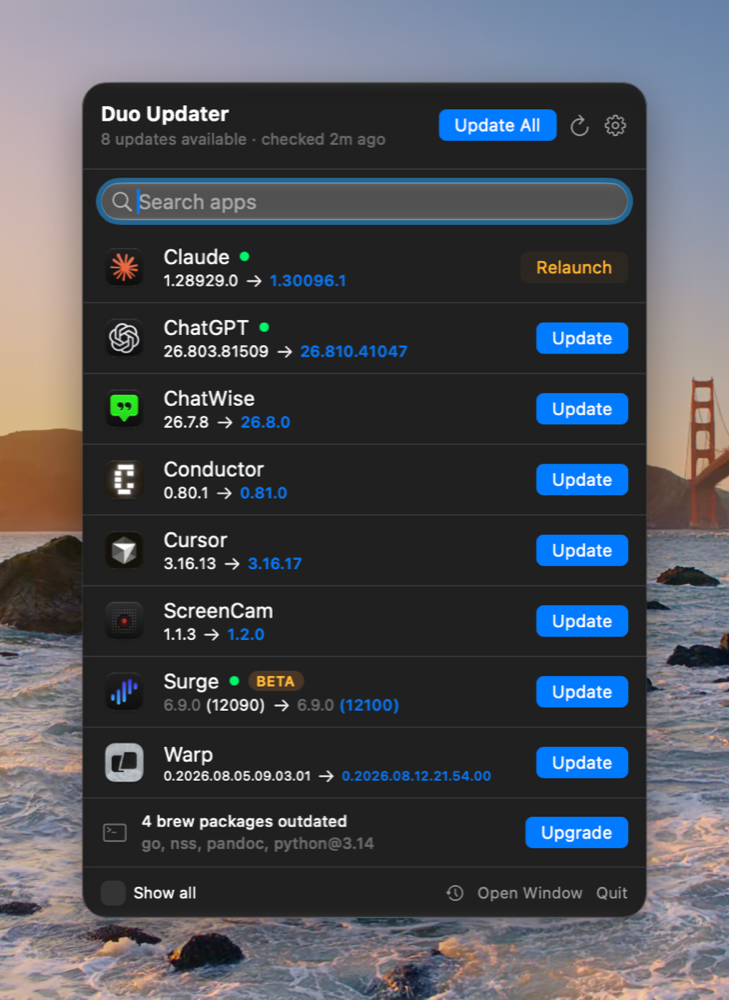
Follow along, don't force
Most updaters pick one mechanism and push every app through it. This one doesn't. It first looks at how the app already updates — some have their own updater built in, some came from the App Store, some were installed with Homebrew — and takes that route. When an app can update itself perfectly well, it hands over and lets it; when it can't do something safely, it says so rather than guessing.
The interface tries to say plainly what's going on. Each row shows what you're going from and to, and the button says what will actually happen: Update installs, Relaunch means the new version is already in place and only the copy you have open is stale. A green dot means the app is running, so you know before you click whether something is about to be closed and reopened.
Installing has a few rules it won't bend. It never force-quits a running app — the app's own save prompts still appear, you can cancel, and cancelling stops it. Major version upgrades get a heads-up first, instead of installing in one click and leaving you to discover you need a new licence. It also keeps a backup, so you can go back if something goes wrong.
Release notes
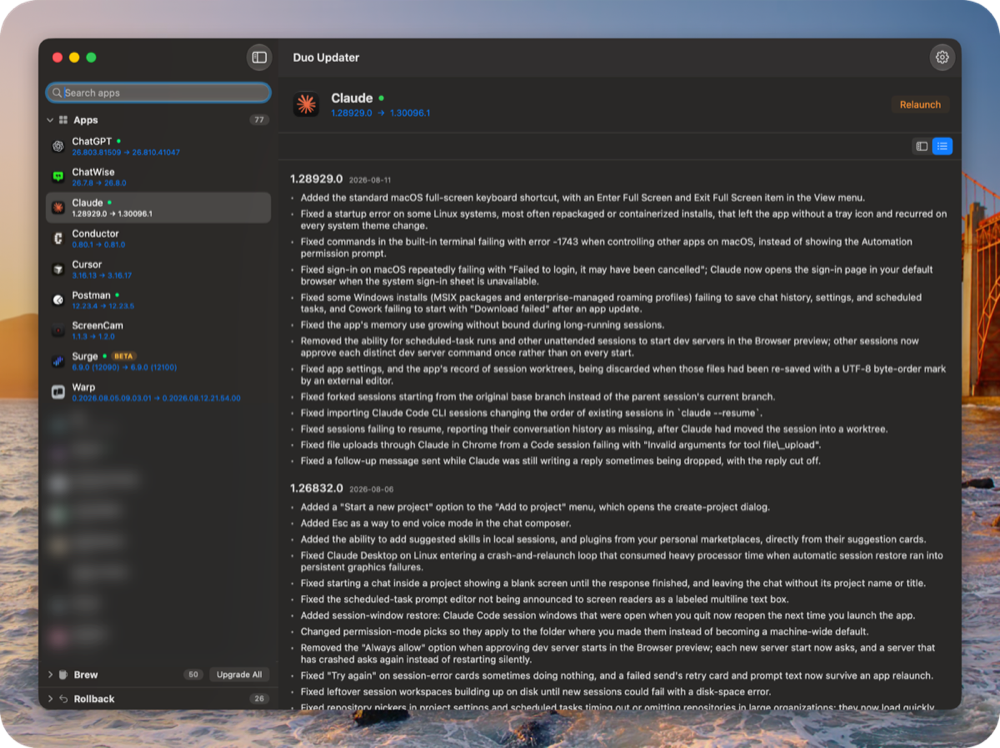
Opening the window shows everything it scanned; click any app to read what changed. Where the vendor writes their notes tidily, they're pulled apart and laid out again — version, date, one bullet per change — so it reads like a set of notes rather than a web page stuffed into a window.
A side effect: the release log
Every version it sees gets recorded, so over time you get a log of when the software you use actually ships.
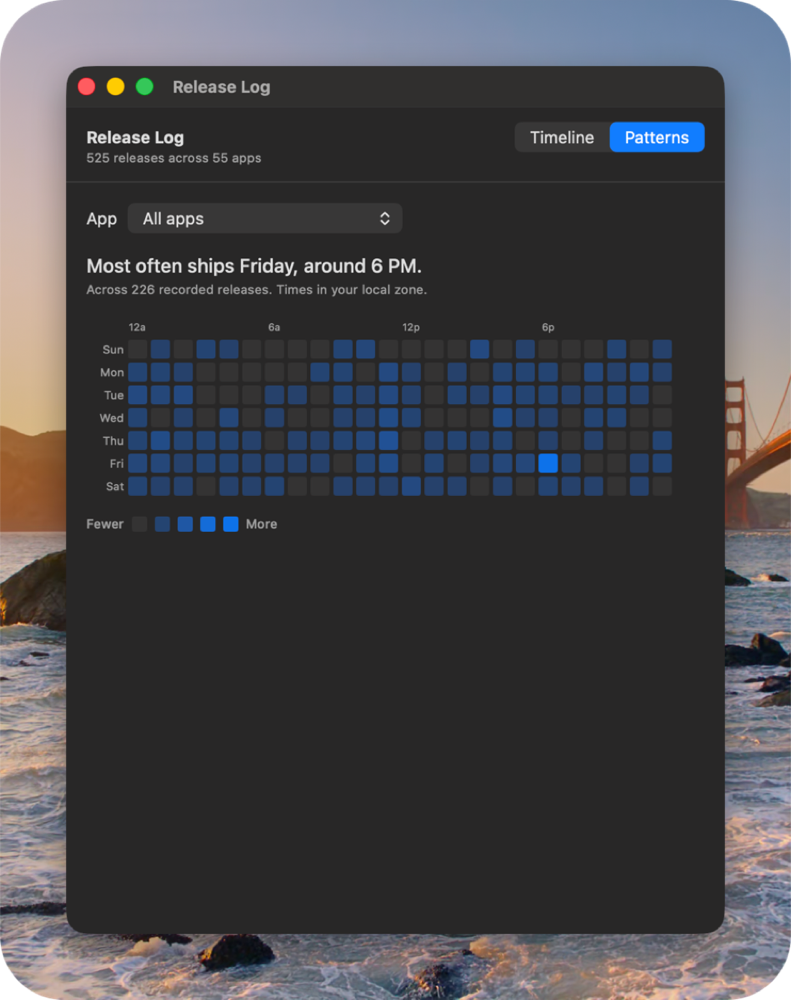
The interesting part is what it refuses to claim. A release time only counts as exact when the software itself published one. Otherwise all we know is that a new version exists, not when it appeared — the honest answer being "somewhere between the last check and this one". Those show as a range with a ≈, and the wider the range the more visibly it's an estimate, rather than a precise-looking lie.
The heatmap below uses only the exact data. On my machine that means 226 of the 525 recorded releases feed the patterns — the other 299 are real releases whose timing is a guess, and a guess has no business shaping a claim about when somebody ships.
Privacy
No telemetry, no analytics SDK, no server of mine. To check whether an app has a new version, the request goes straight to that app's vendor and carries only what the check needs: the app's own version number. Anything you enter yourself (an account token, say) lives in the system Keychain — not synced, not sent anywhere.
macOS will ask for a few permissions along the way. You can say no to all of them at first: looking needs none — the list, the version checks and the release notes all work regardless. When you actually want it to install something or reopen an app for you, granting them then is soon enough.
Download
github.com/jizhi0v0/duo-updater — notarized builds are on the Releases page, and once installed it keeps itself up to date. If you prefer the terminal, the same engine ships as a duo command that can check, install and roll back.
Requires macOS 14+, and Apple Silicon only — a deliberate trade-off: the download addresses it works from are the Apple-chip ones, so forcing it onto an Intel Mac would end with installs that report success and apps that won't open. Better to not support it yet.