As of Surge Mac 6.7.0, Tailscale is built in as a proxy policy. You no longer run a separate Tailscale client — Surge itself joins the tailnet as a node (and coexists with the official Tailscale client too — they don't interfere, and no extra config is needed), then routes matched traffic to machines inside it. Reaching internal devices, the NAS back home, a dev box — all go through this policy. Here's a minimal config you can copy verbatim.
Requires Surge Mac 6.7.0+. Note that 6.7.0 (11310) currently ships on the beta channel — switch Surge's update channel to beta to receive it. iOS has supported it since Surge iOS 5.102.0 (3730), though there the connection is lazy — it only dials the tailnet on your first request to a tailnet domain (and stays connected afterward), so until then the node shows as not connected (not green) in the Tailscale console, turning green after a request; that's expected. It's still an early beta — only TCP-based control / DERP paths are supported, UDP direct paths are not.
Minimal config
[General]
dns-server = 223.5.5.5, 119.29.29.29

[Proxy]
ts-home = tailscale, section-name=Home

[Rule]
DOMAIN-SUFFIX,tailXXXXXX.ts.net,ts-home # the full-domain suffix
IP-CIDR,100.64.0.0/10,ts-home,no-resolve
IP-CIDR6,fd7a:115c:a1e0::/48,ts-home,no-resolve
IP-CIDR,192.168.50.0/24,ts-home,no-resolve # subnet, if you have one
FINAL,DIRECT

[Tailscale Home]
auth-key = tskey-auth-....
hostname = surge-mac
dns-server = 8.8.8.8, 1.1.1.1
prefer-ipv6 = false
Walking through it
ts-home under [Proxy] is a Tailscale policy:
section-name=Homepoints at the[Tailscale Home]section below — the names have to match.
[Rule] decides what enters the tailnet:
DOMAIN-SUFFIX,tailXXXXXX.ts.netmatches MagicDNS names. Surge can resolve MagicDNS names, but you still need an explicit rule to route them into the Tailscale policy.IP-CIDR,100.64.0.0/10is the 100.x range (CGNAT) Tailscale assigns to nodes — fixed for everyone.IP-CIDR6,fd7a:115c:a1e0::/48is Tailscale's IPv6 range, identical across all tailnets — copy it as-is.IP-CIDR,192.168.50.0/24is an example subnet route: once a machine in the tailnet advertises your home LAN withtailscale set --advertise-routes=192.168.50.0/24and you approve that route on the console's Machines page, adding a rule for that range lets you reach devices that don't run Tailscale at all. Drop this line if you have no subnet.no-resolveskips a pointless DNS lookup for pure-IP rules.FINAL,DIRECTis the catch-all; everything else goes direct.
Don't agonize over whether more rules are needed: 100.64.0.0/10 and fd7a:115c:a1e0::/48 are Tailscale's two supersets. Node addresses, the MagicDNS resolver 100.100.100.100, the IPv6 service address fd7a:115c:a1e0::53, the 4via6 tunnel range — they all fall inside these two, already covered. The only thing outside them that you'd add an IP-CIDR for is the subnet route above.
[Tailscale Home] is the node itself:
auth-keyregisters this Surge instance into your tailnet. It's only used on the first connection; afterward Surge caches the node state. Changing this value clears that state and re-registers the device.hostnameis the device name shown in the tailnet; omit it and one is generated.dns-server/prefer-ipv6set the DNS this policy uses and whether to prefer IPv6.
Five easy things to miss
-
Swap the MagicDNS suffix for your own.
tailXXXXXX.ts.netis just the example tailnet name; every account's is different. In any device's Tailscale addresses (in the console or the Mac app), the second half of the MagicDNS namehostname.tailXXXXXX.ts.netis your suffix. ReplacetailXXXXXX.ts.netin the rule with it.100.64.0.0/10andfd7a:115c:a1e0::/48are fixed ranges — leave them alone.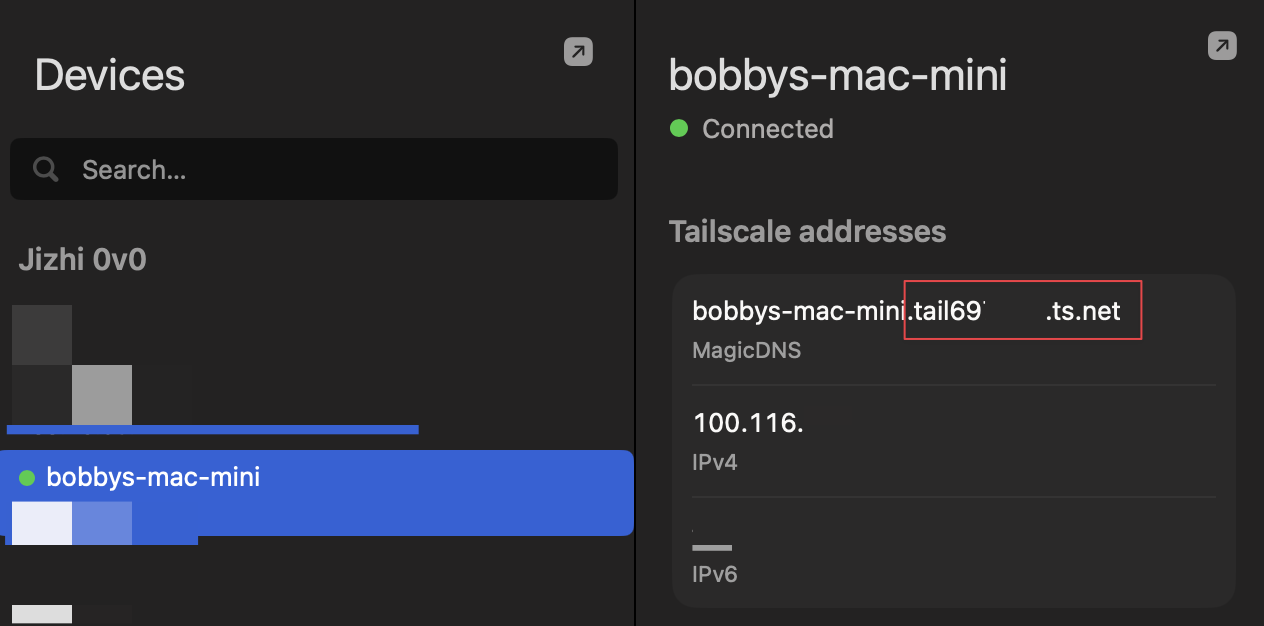
-
Generate your own auth-key. In the Tailscale console, Settings → Keys → Generate auth key (Reusable is handy), and drop the
tskey-auth-...intoauth-key.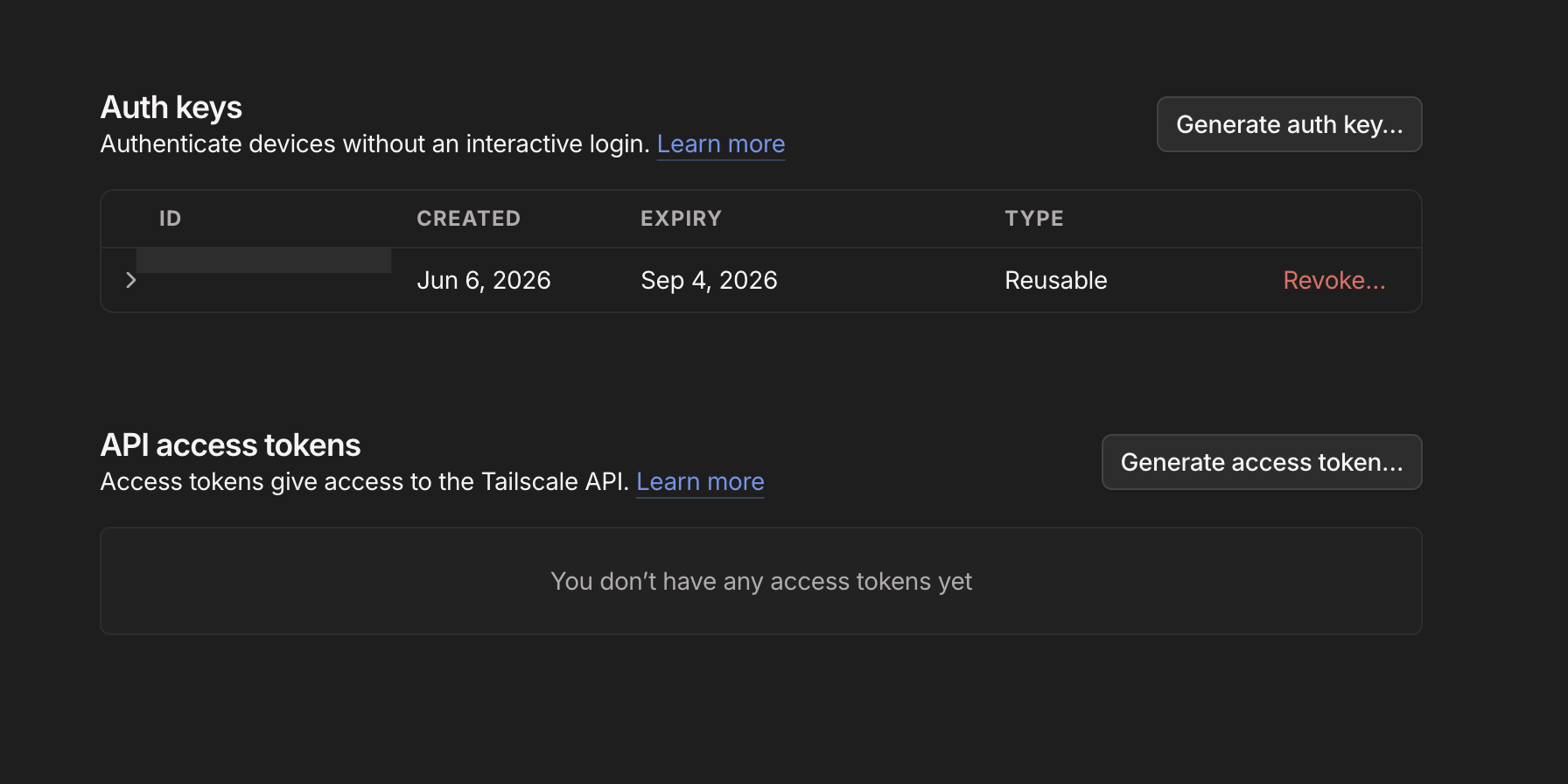
-
Add
underlying-proxyonly when you need it. It usually connects fine without one, so it isn't required. The first connection may need a cold start, so give it a moment; only if it really won't connect, addunderlying-proxytots-homeand point it at an outbound policy:ts-home = tailscale, section-name=Home, underlying-proxy=proxy proxy = ss, your-server.com, 8388, encrypt-method=chacha20-ietf-poly1305, password=YOUR_PASSWORDReplace
proxywith your own node (Surge's comma-separated fields, not a rawss://URL; any protocol works).underlying-proxyis the right fix only when the control plane / DERP is genuinely blocked: the embedded node's cold-start handshake can't reach Tailscale's servers, so pointts-home's underlying proxy at a policy with reliable egress and reload. But don't jump to the wall — "matchesPolicy: ts-homeyet keeps timing out / working only intermittently" can equally be the embedded node's IPv6 bug on an IPv4-only network (whereunderlying-proxydoes nothing and you want askip-proxybypass to the official client instead). First use the checklist in Tailscale direct vs DERP to tell "the network blocked it" from "the implementation broke." -
prefer-ipv6depends on your service. Settrueonly if the target service listens on IPv6; otherwise keep itfalseand stay on v4. Withtrue, Surge resolves MagicDNS names tofd7a:..., and many self-hosted services only listen on v4 — so the connection fails. -
Don't leave tailnet ranges in
skip-proxy. If[General]'sskip-proxycontains*.ts.netor100.64.0.0/10(some configs add these so the official client owns the tailnet), that traffic bypasses Surge entirely and thets-homerules above never fire — you'll see requests go direct, matching no policy at all. When switching to Surge's built-in Tailscale, remove both fromskip-proxy.
Let Claude set it up
Rather than editing line by line, hand the prompt below to Claude Code (or any other LLM agent that can run commands on your Mac) and let it wire things up following the config above:
You're helping me configure Surge Mac. The goal: add Tailscale to my Surge config so I can reach devices inside my tailnet by rule. Treat this article as the source of truth for the config: https://www.jizhiovo.com/posts/surge-mac-tailscale

Always follow these:
- Never touch the original profile I pick until I explicitly approve the merge — make all edits on a backup copy.
- Don't read the bodies of sections like [General] or [Proxy] — they can hold auth-keys, passwords, and other secrets. Locating a section needs only a grep of its header line; put new content on the line below the header.
- Re-check the conf syntax after every edit; only have me reload once it passes.
- Wherever it says "pause for confirmation," wait for my reply before continuing — don't run ahead.
- If you're missing something (a value to fill in, an address to hit), ask me — don't guess.

Steps:
1. Preflight the version: confirm this Surge Mac supports Tailscale (needs 6.7.0+). If not, tell me to switch the update channel to beta and install the latest build, then stop.
2. Install the skill Surge ships: symlink the skill in /Applications/Surge.app/Contents/Resources/Skills/ into my skills directory so it updates along with Surge. If that directory doesn't exist, the version most likely doesn't support this — go back to step 1.
3. List the profiles you can find (the .conf files in the Surge profile directory) and have me pick which one to work on — the CLI can't tell which profile is currently active, so don't guess. Pause for confirmation: wait until I've chosen.
4. Once I confirm, copy the conf to a backup and only edit the backup from here on. Following the article: use grep to find the [Proxy] and [Rule] header lines, insert the ts-home policy on the line below [Proxy] and the matching routing rules on the line below [Rule] (put them first, so they match before other rules), then append the [Tailscale ...] section at the end of the file — without reading the existing bodies of those sections. Also grep [General]'s skip-proxy line and, if it contains *.ts.net or 100.64.0.0/10, remove those from the backup — otherwise tailnet traffic bypasses Surge and the rules never fire. Note: if the [Rule] body is just an #!include of another file (the rules live in the included file), inserting below the header leaves a rule block that doesn't end in FINAL and the syntax check fails — in that case add the rules at the top of the included file's rule list, and copy that file too, repointing the include at the copy. Then check the syntax.
5. If the syntax is clean, open the backup in my default editor. I need to fill in two things: the auth-key and the MagicDNS (full-domain) suffix. The suffix you can read via the tailscale CLI and pre-fill if I have Tailscale installed locally; the auth-key can't be pulled locally — I have to generate it in the Tailscale console (Settings → Keys), so just remind me to paste it in.
6. Have me switch Surge to this backup and reload. Then verify by reaching a service on a remote tailnet device; if you don't have an address, ask me for a URL.
7. If Tailscale is installed locally, also confirm this Surge node's hostname registered into the tailnet and shows as connected.
8. Verify with a real request. The first cold start is slow, so try at least twice. If it still won't connect, ask whether I have a usable proxy to forward through, have me give its policy name, add underlying-proxy to the matching Tailscale policy, then re-verify.
9. Once it works, pause for confirmation: ask whether to merge the changes back into the original profile — if yes, mv the backup over the original conf; if no, keep both.
Limitations
- Only TCP-based control and DERP paths are supported — no UDP direct path (the reason, plus a real failure that's easily mistaken for the GFW but is actually the embedded node's IPv6 handling, is in Tailscale direct vs DERP).
- It only acts as a client reaching into the tailnet. The policy supports just
auth-key/hostname/control-url/mtu/dns-server/prefer-ipv6— noadvertise-routes/exit-nodeand the like — so it can't be an exit node or subnet router, and other devices can't route out through this Surge instance or reach the LAN behind it. - It's still beta. It's enough as a lightweight, rule-driven entry into your internal network; for the full Tailscale experience, install the official client.